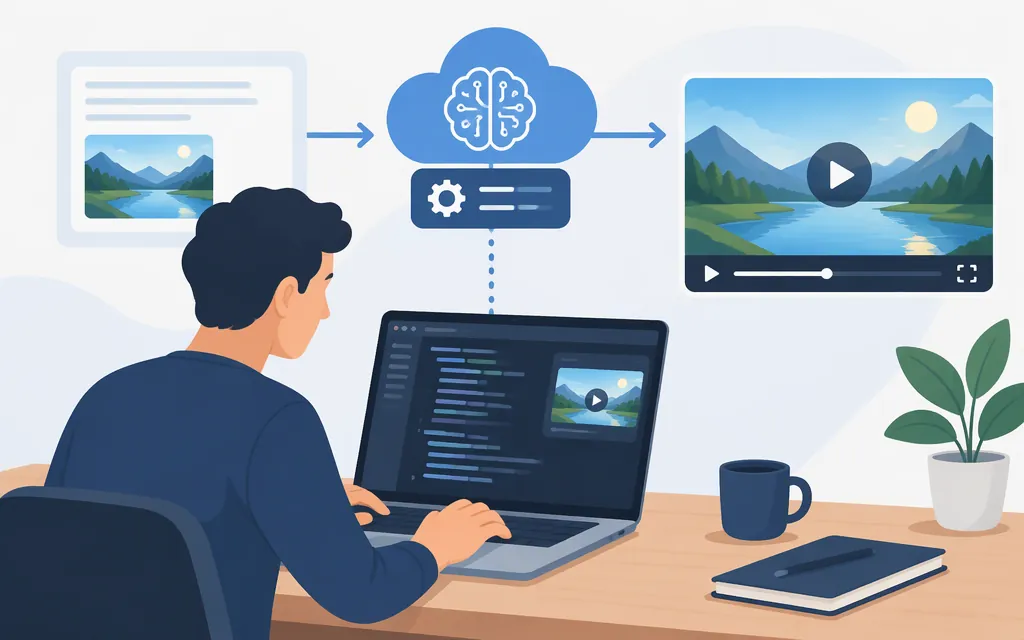
An AI video generation API often returns a job identifier before the finished video is ready. Submit a request, save its task ID, track completion through polling or a supported callback, then retrieve and store the output. The exact endpoints, task states, media limits, callback behavior and charges depend on the provider and model—treat that API’s documentation as its contract, not as a universal pattern.
Runway’s documentation provides one example of task creation, polling, input requirements and API pricing. Shotstack documents a callback-based render workflow. These illustrate different approaches; neither defines a standard for every video API. (Runway API documentation)
The request-to-video lifecycle
A typical asynchronous workflow has five steps:
- Authenticate and submit. Send the provider’s documented request with the model and required prompt or media inputs. Keep credentials on your server, not in a browser or mobile app.
- Save the task ID. The initial response may acknowledge a job rather than contain a video. Store its ID with your own user or job record.
- Wait for completion. Poll a documented status endpoint, or receive a callback if that API supports one. Don’t assume providers share status names, polling intervals or callback behavior.
- Handle success or failure. On success, retrieve the output location. On failure, record the provider’s error details and assess the cause before retrying.
- Fetch and validate the video. Download or copy the file into storage you control if you need to retain or serve it. Check that it is usable before marking your own job complete.
For example, Runway documents POST /v1/image_to_video for starting an image-to-video task and GET /v1/tasks/{id} for retrieving its status. Its documented states include PENDING, THROTTLED, RUNNING, SUCCEEDED, FAILED and CANCELLED. A successful task includes an output array; a failed task includes failure details. THROTTLED means the task is queued behind a limit, not necessarily failed. (Runway SDK and task documentation)
A documented Python example with Runway
Prerequisites: a Runway developer account and API key, Python 3.9 or later, and an image URL that meets Runway’s input requirements. The current official Python SDK repository describes the library as supporting Python 3.9+; the example below follows the current SDK documentation and repository, rather than a pinned package release. Install the SDK and provide the API key through the environment variable Runway documents for its SDKs:
pip install runwayml
export RUNWAYML_API_SECRET="your_api_key"
Create the task, record its ID before waiting, then wait for the result:
from runwayml import RunwayML, TaskFailedError

client = RunwayML()

generation = client.image_to_video.create(
    model="gen4.5",
    prompt_image=(
        "https://upload.wikimedia.org/wikipedia/commons/8/85/"
        "Tour_Eiffel_Wikimedia_Commons_%28cropped%29.jpg"
    ),
    prompt_text="A timelapse on a sunny day with clouds flying by",
    ratio="1280:720",
    duration=5,
)

task_id = generation.id
print("Started task:", task_id)  # Persist this ID in your application.

try:
    completed = generation.wait_for_task_output()
    video_url = completed.output[0]
    print("Video URL:", video_url)
except TaskFailedError as exc:
    print("Generation failed:", exc.task_details)
Runway’s guide documents this SDK pattern, model, parameters and TaskFailedError.task_details field. Its setup guide says the SDKs automatically add the key when it is specified in RUNWAYML_API_SECRET; keep the key out of client-side code. (Runway getting-started guide, Python SDK repository, Runway setup guide) (github.com)
A local waiting timeout is not, by itself, evidence that the remote generation failed. Save the task ID before waiting; if your application stops waiting, check that ID later with client.tasks.retrieve(task_id) or the documented task-status endpoint. Treat a provider-reported task failure separately from a timeout in your own waiting process. Runway’s task output URLs are temporary and expire within 24–48 hours of accessing the API, so download or otherwise store anything you intend to keep. (Runway task documentation, Runway output documentation)
Polling or callbacks?
Polling means your service asks the provider for task status at intervals. It is straightforward to implement, but frequent checks can add unnecessary requests. Follow the provider’s guidance rather than using a tight loop. For Runway, the SDK handles polling; its documentation recommends intervals of at least five seconds, jitter, and exponential backoff for non-200 responses. (Runway SDK documentation)
A callback or webhook means the provider sends an HTTP request to your application when a job reaches a relevant state. Your service needs a reachable endpoint and a way to associate the event with the job you saved. This can reduce repeated status requests, but your endpoint must be able to receive and process the notification. (Shotstack webhook documentation)
Shotstack documents a render workflow in which you pass a callback URL with an edit and receive a POST when rendering completes or fails. Its guide describes using the callback status to trigger a next step, such as saving or downloading the result. That is Shotstack’s documented workflow—not a general callback parameter to assume for another provider. (Shotstack webhook documentation)
As an integration-design practice, make callback processing safe to repeat: record the event, match it to a known job, and avoid performing a completion action twice. Check the provider’s documentation for callback authentication, retries and event fields; don’t assume those details if they aren’t specified.
Check media inputs and outputs before you build
Media support is model- and endpoint-specific. Before choosing an API, check:
- Which inputs the specific model accepts: text, image, video, audio, portrait, or combinations.
- Accepted file formats, sizes, durations and counts.
- Whether to upload files, pass a URL or embed data, and the applicable URL-access requirements.
- The model’s output format, resolution, duration and audio behavior.
- Whether output links expire and how to store the file for your product.
Runway’s documented input limits vary by method. Image, video and audio inputs provided by URL have limits of 16 MB, 32 MB and 32 MB, respectively; data URIs are limited to 5 MB. Runway’s ephemeral upload method supports files up to 200 MB, but the resulting runway:// URI expires after 24 hours. (Runway input documentation, Runway ephemeral-upload documentation)
Runway also documents URL-specific requirements: URLs must use HTTPS, the server should return valid Content-Type and Content-Length headers, and redirects are not followed. Check these requirements for Runway URL inputs; do not assume another provider has the same rules. (Runway input documentation)
For an editing or assembly API, distinguish render completion from availability of the finished file at its hosting destination. Shotstack says its CDN copy can take a few seconds to arrive after the render is done; its Serve API or a hosting webhook can confirm availability. The URL in the render-status response is a temporary link to the raw output and expires after 24 hours. By default, rendered files are also sent to Shotstack’s CDN, where they remain hosted; if you opt out of that hosting, download or transfer the file within 24 hours. (Shotstack hosting documentation, Shotstack temporary-output documentation) (shotstack.io)
Estimate cost from the API’s billing unit
Consumer plans and API prices are not interchangeable. Compare the API-access tier or account requirement, currency, billable unit, included quota and its period, and how model, resolution, duration or reference media affect the charge. If the provider bills in credits, find both the credit price and the model’s credit consumption; the price of one credit alone does not tell you the cost of a video.
A worked example from Runway’s published API rates:
- Runway lists WAN 3 at 720p for 10 credits per second.
- Its pricing page says credits cost $0.01 USD each.
- At that listed rate, a five-second generation uses 5 × 10 = 50 credits, or 50 × $0.01 = $0.50 USD.
This calculation assumes one five-second generation and excludes retries and applicable taxes. Check the rate for the model and settings you actually use; costs can differ across models. (Runway API pricing)
Don’t compare unlike prices as though they were equivalent. A monthly subscription may not include API access; a credit rate may not say how many credits a generation consumes; and a free rendering allowance may omit its reset period. A vendor-authored comparison contains unresolved Colossyan price and HeyGen API-access discrepancies, so check each provider’s current API documentation before budgeting. (Shotstack’s API comparison)
Choose by the job your product needs to do
Start with the output, then shortlist APIs that document the inputs and workflow you need:
| If your product needs… | Consider… | Trade-off to check |
|---|---|---|
| Original, prompt-directed scenes | A generative video model | Prompt and reference controls, supported durations and resolutions, and whether the output suits your use case. |
| A presenter delivering a script | An avatar or talking-head API | Script, voice and likeness controls; API eligibility; and whether the result fits your required scenes and layout. |
| A live, conversational digital character | A real-time avatar interface | Whether the API supports live interaction or generates a downloadable video; these are different workflows. |
| Combining clips, voiceover, titles and brand assets | A video editing or assembly API | Timeline control, asset ingestion, render completion, output hosting and storage. |
These are categories, not a ranking. A vendor-authored Shotstack comparison makes similar distinctions between presenter-oriented avatar tools, creative video-generation tools and editing workflows, but it is not an independent benchmark. Use roundups to discover candidates—not to establish current API access, quality or price. (Shotstack’s API comparison)
A practical selection test is to run the same representative task through shortlisted candidates, then compare the documented API workflow, input compatibility, usable outputs and actual charge. For a scripted training video, test the required narration and branding. For a generated scene, test the references and visual constraints your product needs. For media assembly, test ingestion and the final render path. Don’t select a provider based only on its web app or a headline quality claim.
Pre-integration checklist
Before committing to an AI video generation API, confirm these items in the documentation for the exact API and model:
- API access, authentication, version headers and endpoint.
- The initial response, task ID, possible states and terminal success or failure fields.
- Polling endpoint and cadence, or callback setup, payload and delivery behavior.
- Failure codes, rate limits, retry guidance and concurrency limits.
- Input formats, size and duration limits, upload or URL rules, and output specifications.
- Whether generated output links expire and how to store durable copies.
- API price, currency, model-specific billing unit, quotas and relevant rounding or minimum charges.
The central rule is simple: the task lifecycle may look similar across services, but the API contract is provider-specific. Build around documented behavior, and make the cost estimate and media checks match the model your product will actually call.
Sources
Runway Dev API Getting Started Guide
Runway Dev Software Development Kits
Runway Dev API Input Parameters
Runway Dev API Pricing & Costs
Runway Dev API Setup & Configuration
Shotstack Webhooks Documentation
Shotstack Host and Serve Video and Images