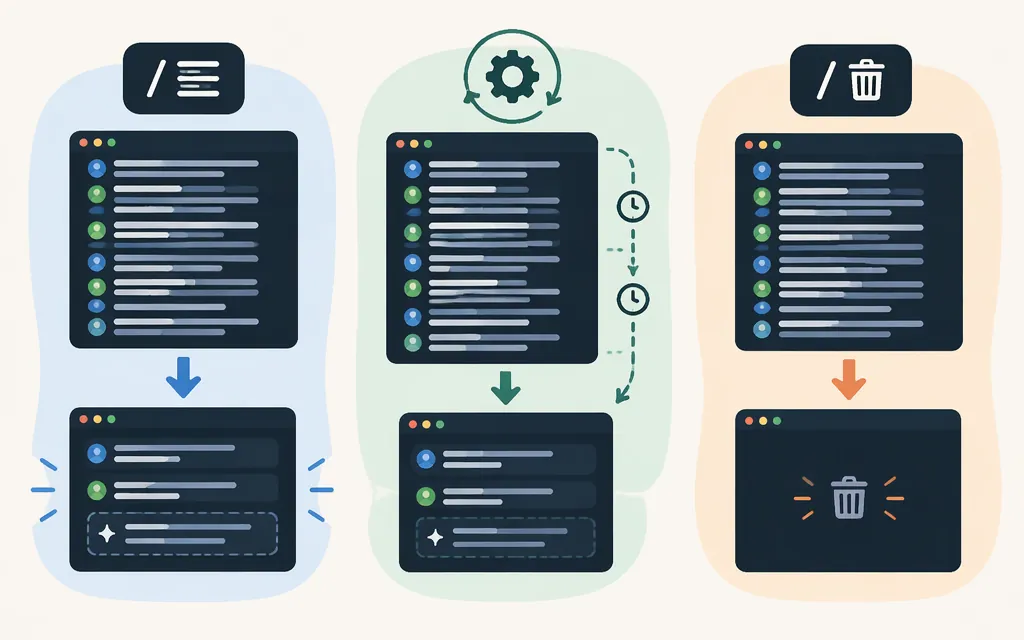
If you searched for “Claude Code compact,” you most likely mean the /compact command for managing a session’s context—not a model called “Compact.” Claude Code documents /compact as a way to summarize a long conversation and free context space. You can add a focus, such as /compact focus on the API changes, to guide what the summary emphasizes. [1][2]
What /compact does
A context window is the information Claude can use during a session. When a Claude Code conversation gets long, /context shows what is filling the window and /compact summarizes the conversation to free space. The summary is meant to help the session continue; it does not promise that every detail will be preserved word for word. [1][3]
To inspect context and compact manually:
/context
/compact
/compact focus on the API changes and pending tests
Claude Code’s documentation confirms that a focus can guide what is preserved during compaction. [2]
Choose: /compact, automatic compaction, or /clear?
| Situation | Choose | Why |
|---|---|---|
| You’re continuing the same feature or investigation and want to reduce the conversation’s context | /compact |
It summarizes the session so you can continue with a shorter context. Add a focus if particular decisions or next steps matter. |
| You’re continuing a long session and don’t need to choose when compaction happens | Automatic compaction | As the context window nears its limit, Claude Code automatically summarizes the task and continues in a new context window. |
| You’re starting an unrelated task and want a fresh session | /clear |
The official command reference says /clear starts fresh on a new task while keeping project memory. Anthropic’s session guide describes it as starting a new session, usually with a brief distilled from what you learned. The cited documentation establishes a new session; it does not say that /clear deletes stored transcripts. [1][8] |
Rule of thumb: compact when continuity matters; start a new session when it doesn’t. The task-based choice is a practical recommendation, not a requirement. Check context with /context; the exact point when automatic compaction runs is not specified here. [1][3]
Is “Claude Code compact” a model choice?
No. /compact is a Claude Code command; model selection is a separate choice. Claude Code documents /model as the command for switching models during a session. [1]
Does Claude Code compaction work as a production API capability?
Claude Code’s /compact command is a Claude Code interface command, not an API endpoint. Anthropic separately documents compaction features for applications using the Messages API. These API features are in beta, and their availability should be checked for the specific feature and model you intend to use. [4][5]
- On-demand API compaction: Your application requests a summary when it chooses. The response contains a signed compaction block that the application carries into later requests in place of the summarized messages. Anthropic directs developers checking model support to call the Models API with the required beta header and inspect each model’s
capabilities.compactionfield. The available documentation excerpt does not provide the literal header value or establish a complete list of eligible deployment channels; check the current documentation before relying on the feature. [5] - Threshold API compaction: The Messages API can summarize older context automatically after a configured input-token threshold is reached. Anthropic labels this feature beta and says it is available on select models. The cited availability summary does not provide a complete model list, so verify eligibility for your model and deployment before relying on it. [4]
These API features are distinct from Claude Code’s terminal command. Anthropic’s Cookbook also demonstrates application-level session-memory approaches, but those are implementation patterns—not evidence that every API application must build its own summarizer. [6]
Bottom line
- Continue related work and want to reduce context: run
/compact, optionally with a focus. - Continue a long session without choosing when to compact: automatic compaction can summarize the task as the context window nears its limit.
- Move to unrelated work: use
/clearto start a fresh session; the official command reference says project memory is kept. The cited docs do not establish that this deletes stored transcripts. [1][8] - Build with the Messages API: evaluate API compaction separately from Claude Code, and verify model and deployment eligibility for the specific feature.
Sources
[1] Claude Code Docs, “Commands”
[2] Claude Code Docs, “How Claude Code works”
[3] Claude by Anthropic, “Using Claude Code: session management and 1M context”
[4] Claude Platform Docs, “Compaction at a token threshold”
[5] Claude Platform Docs, “Compaction on demand”
[6] Anthropic Cookbook, “Session memory compaction”
[7] Decode Claude, “Inside Claude Code’s Compaction System” (reverse-engineered account)
[8] Claude Code Docs, “Commands” and Claude by Anthropic, “Using Claude Code: session management and 1M context”
Sources
How Claude Code works — Claude Code Docs
Using Claude Code: session management and 1M context
Compaction at a token threshold — Claude Platform Docs
Compaction on demand — Claude Platform Docs