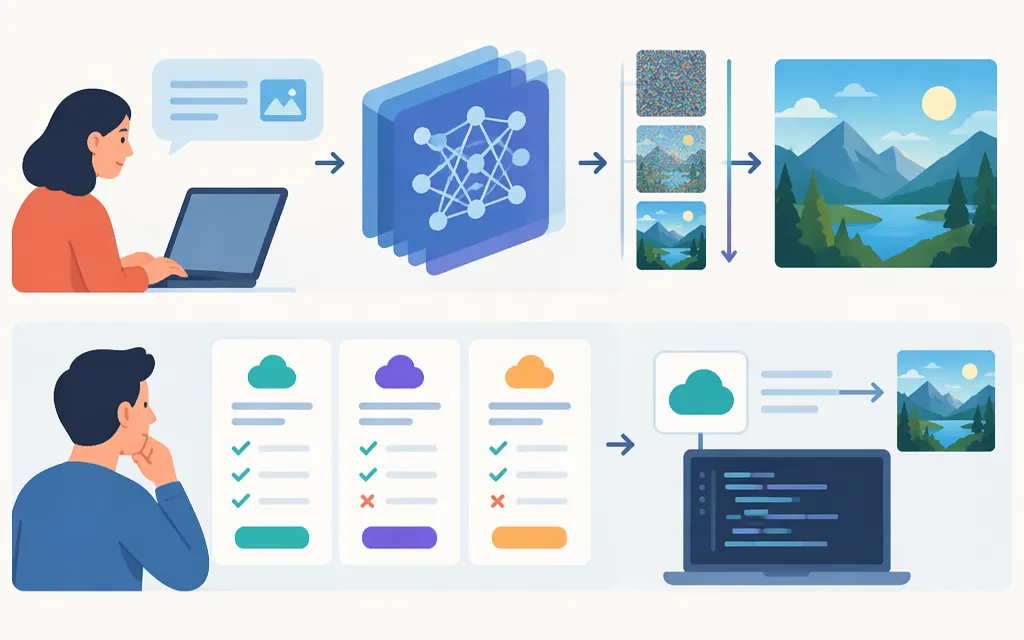
AI image generation uses a model to create or edit an image from a prompt and, sometimes, reference images. Training is when a model learns patterns from data; generation is when it applies what it has learned to a particular request. The generation process depends on the model: diffusion models iteratively reverse a noise process, while autoregressive models can predict image content sequentially. Some systems combine components from different approaches, so not every image API works the same way. (Denoising Diffusion Probabilistic Models; Image GPT)
For a production choice, focus on whether a particular model and API support your task: generating from text, editing existing images, accepting reference inputs, producing the format you need, or refining results over multiple turns. For example, OpenAI’s API documentation describes image generation and editing through the Image API, and image generation within conversational or multi-step flows through the Responses API. Those are provider-specific options, not universal features. (OpenAI image generation guide)
From training to a generated image
It helps to separate what the model learns in advance from what happens for each request:
- Training: The model learns patterns in its training data. In a diffusion approach, a forward process gradually adds noise to data, and the model learns transitions that reverse that process. This describes diffusion models, not all image models. (Denoising Diffusion Probabilistic Models)
- Input: A request provides a prompt and may include reference images. A text-to-image diffusion implementation can use text conditioning to guide image synthesis; the specific conditioning method varies. For example, the GLIDE research paper studies text-conditional diffusion and compares CLIP guidance with classifier-free guidance. (GLIDE)
- Image creation: A diffusion model starts from noise and iteratively denoises. An autoregressive model instead predicts a sequence of visual elements. OpenAI’s Image GPT research describes training a transformer on images unrolled into pixel sequences. Other systems can combine a sequence-predicting model with a separate decoder: OpenAI’s GPT-4o image-generation post illustrates a pipeline from tokens to a transformer to diffusion and then pixels. (Image GPT; Introducing 4o Image Generation)
- Output: The API returns an image or image data. Available formats and editing controls depend on the provider, model, and endpoint. Check the relevant documentation rather than assuming a capability applies across models.
These are examples of mechanisms, not a universal pipeline. An API’s ability to accept reference images or make edits also does not guarantee that every detail will be preserved exactly.
Diffusion, autoregressive models, and GANs
| Approach | Simplified mechanism | What to keep in mind |
|---|---|---|
| Diffusion | Learns to reverse a gradual noise process; generation iteratively denoises. | A useful mechanism to understand, but the label alone does not tell you whether a model suits your task. (DDPM paper) |
| Autoregressive | Predicts a sequence of image content; a decoder may turn that representation into pixels. | The sequence and decoder can vary. Image GPT predicts over pixel sequences; other systems may use a separate decoder or combine components. (Image GPT; GPT-4o image generation) |
| GAN | A generator creates images while a discriminator learns to distinguish generated images from examples. | Useful background for understanding another generative approach; the architecture description alone is not a recommendation for a current API. (ThingLink’s overview) |
An architecture label is not a quality score. Confirm a candidate model’s documented capabilities, then evaluate it on representative prompts and edits from your own workflow. The sources cited here do not establish a complete, current ranking of models by quality, speed, or prompt adherence.
Choosing a production image-generation API
Start with the job the image needs to do, then map it to capabilities documented for the specific provider and model. OpenAI is used below as an example; this is not a claim about TokenForgeCloud products or availability.
- One-shot generation or editing: OpenAI documents Image API endpoints for generating images from prompts and editing existing images. Check the endpoint and model documentation for the inputs and controls that apply to your use case. (OpenAI image generation guide)
- Conversational or multi-step editing: OpenAI documents image generation through the Responses API for conversational or multi-step flows. Consider this pattern if your product needs back-and-forth refinement. (OpenAI image generation guide)
- Inputs and outputs: Verify supported text and image inputs, output formats, image sizes, quality controls, and editing features against the chosen model’s documentation. Do not assume a feature is available from every provider or model.
- Operational fit: Check the current model identifier and version, prerequisites, request limits, and pricing in the provider’s documentation. These details can vary by model and change over time.
A practical comparison is to run the same representative tasks through each candidate—for example, create a product-background variant, edit a reference image while preserving a specified object, and render a short headline in a fixed layout. Record whether outputs meet your acceptance criteria, how much human correction they need, and the latency and cost measured in your own environment. This is a suggested evaluation method, not a test performed for this article.
Plausible does not mean verified
A generated image can look convincing without being factually reliable. If details matter—such as in a labeled diagram, product depiction, or visual someone will rely on—compare the result with trusted references and have a person review it before use. For repeated images of the same subject, test the specific workflow across several edits rather than assuming identity or design details will remain unchanged.
In short: define the image task, verify that the specific API model documents the needed inputs and outputs, evaluate it with representative examples, and review important results against relevant facts or reference images.
Sources
Denoising Diffusion Probabilistic Models
GLIDE: Towards Photorealistic Image Generation and Editing with Text-Guided Diffusion Models
Introducing 4o Image Generation
How Does AI Art Work? A Super Simple Guide to the Best AI Image Tools.