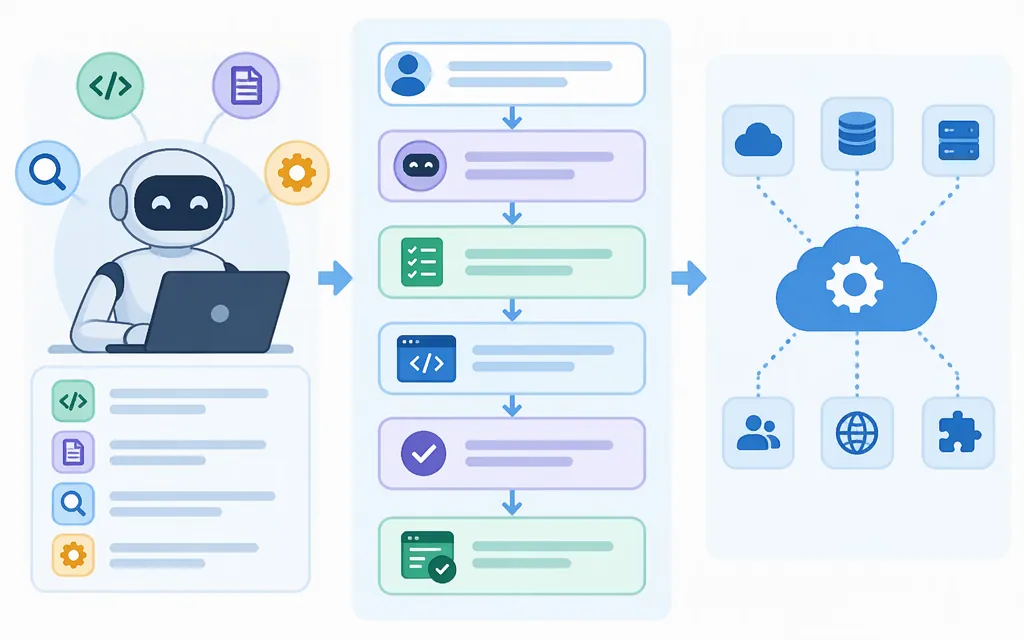
How Codex works
Codex is OpenAI’s coding agent for writing, reviewing, and debugging code. It combines a model with an agent loop that can use tools, respond to their results, and continue working toward an answer or coding artifact. Codex is available through several developer-facing experiences, including the CLI, IDE, web, and mobile; those experiences are distinct from a direct model API call. (developers.openai.com)
At a high level, a coding task follows this loop:
- Provide a task and relevant context. For example, ask it to investigate a bug or change code in a project.
- The agent gives instructions and context to a model. The model can respond or request that a tool be used.
- Codex runs the requested tool and returns its result to the model. For coding work, the configured tools and environment may let it inspect files or run commands.
- The model uses the result to continue, request another action, or produce a final response. This can repeat as the agent works through the task.
- Review the response and any changes before accepting them. A completed task alone does not prove that the change is correct or ready to ship.
OpenAI describes the interaction among the user, model, and tools as the Codex agent loop. In the Agents API, OpenAI manages the Codex harness and session orchestration; the application supplies the task and configuration and chooses the execution environment. (developers.openai.com)
A simple example
Suppose you ask: “Find why this test fails and propose a fix.” Codex needs the relevant code and failure context. Depending on the selected product and environment, it may inspect files or run commands, use those results to guide further work, and return an explanation or code changes. This illustrates the agent workflow; it is not a report of a particular test run or a guarantee that every setup can access a repository or run that test.
What you should review
Review the proposed change itself, not only the agent’s summary. Check that it addresses the intended problem, inspect edge cases and security-sensitive changes, and run the checks your project requires. If Codex reports that a command or test ran, that is evidence about that command in that environment—not proof that every relevant case was tested. In the Agents API, the environment can be OpenAI-hosted, self-hosted, or omitted, depending on the task and configuration. (developers.openai.com)
Codex agent vs. a production API
If you want to build an application around the managed Codex agent, the Agents API is the documented route. It is currently in beta. Your application creates an API key in an OpenAI Platform project and grants it api.agents.read, api.agents.write, and api.responses.write permissions. Keep the key outside the agent’s sandbox. The SDK adds the required OpenAI-Beta: agents=v1 header automatically. (developers.openai.com)
Here is OpenAI’s minimal Python quickstart pattern for creating a session in an OpenAI-hosted sandbox and streaming its events:
from openai import OpenAI

with OpenAI() as client:
    with client.beta.agents.sessions.create(
        agent={
            "model": "gpt-6-astra",
            "instructions": "Write clean code, run it, and report the actual output.",
        },
        environment={"type": "openai_hosted"},
        input="Create tree.py, a Python script that prints a readable tree of the files in the current directory. Run it and show me the output.",
        stream=True,
    ).with_result_collection() as stream:
        for event in stream:
            print(event.to_json(indent=None), flush=True)
        result = stream.get_final_result()
        print(result.output_text)
        session_id = result.session_id
Install or update the SDK with pip install --upgrade openai and set OPENAI_API_KEY in the environment before running the script. The call streams events, then exposes the final text and session ID; the actual text and files depend on the task and run, so the snippet does not imply a fixed result. (developers.openai.com)
For a hosted sandbox, OpenAI provisions and manages the environment. Model usage is billed at the selected model’s API rates; OpenAI tools and hosted sandboxes have their applicable rates, with sandbox usage billed at standard container rates. Check current pricing and the environment documentation before estimating production costs. The Agents API FAQ says data residency is currently supported in the United States only. (developers.openai.com)
Choose the route that matches the work:
- Agents API: use it when your application needs the managed Codex harness for multi-step tasks, sessions, and tool use. A completed turn does not mean every tool succeeded; inspect the reported results and session activity. (
developers.openai.com) - Responses API with a coding-capable model: use it when your application needs a model response about code and you will supply the relevant code and handle any surrounding workflow yourself. OpenAI’s code-generation guide gives a
gpt-6-astraexample usingclient.responses.create(...)andresult.output_text. This is a model call, not the managed Codex agent session shown above. (developers.openai.com) - Codex product or SDK: use a developer-facing Codex experience to delegate coding work, or the SDK to embed the CLI agent in your own workflow. These are separate from calling a model directly. (
developers.openai.com)
In short, Codex works by combining a model with an agent loop that can use tools and respond to their results. For an application that needs the managed Codex harness, the Agents API provides a documented, beta session workflow; for a direct code-focused model response, use the Responses API instead.