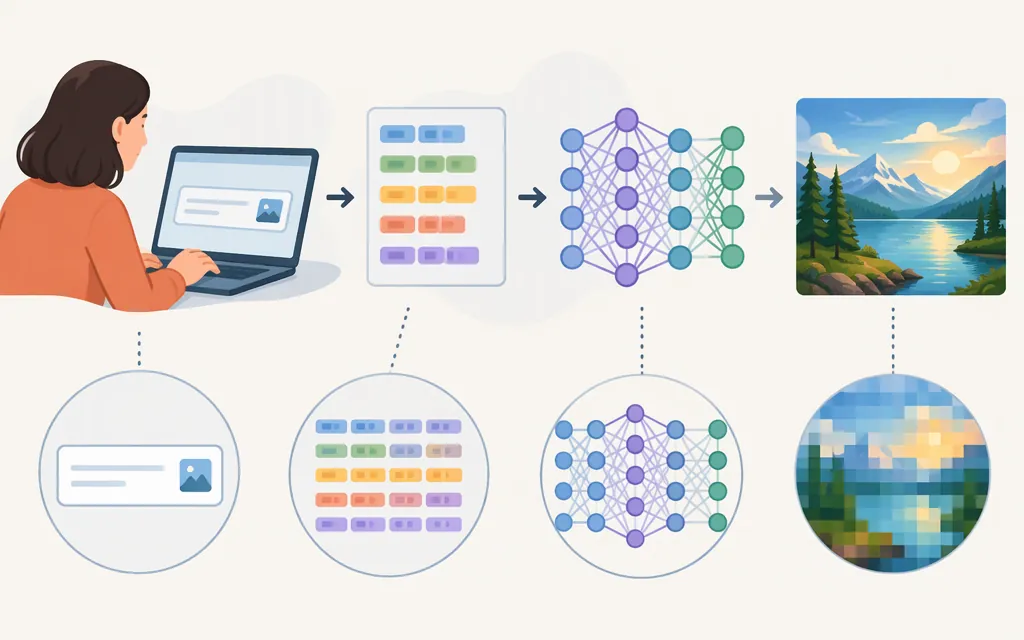
AI image generation turns a prompt into a new image by using patterns learned during training. In many text-to-image systems, the prompt is encoded into a form the model can use to guide generation; diffusion systems typically start with noise and refine it into an image. That’s a useful high-level picture—not a description of every image generator or a specification for any particular API. University of Toronto Libraries and MIT CSAIL explain these ideas at an introductory level.
How AI image generation works
It helps to separate training—how a model learns—from generation—what happens when you submit a prompt.
- Training establishes patterns. A model is trained on examples and learns statistical relationships in them. For text-to-image models, educational explanations describe those examples as images paired with captions or other text. This does not mean a model searches for and returns a particular training image each time you prompt it; it generates an output based on learned patterns. The exact data and training process vary by model. (MIT CSAIL; University of Toronto Libraries)
- The prompt is made usable to the model. A text encoder can map a prompt into numerical representations that capture information about its words and meaning. Those representations help guide image generation. This is a simplified explanation: the details depend on the model, and the numbers should not be thought of as a complete, literal specification of the scene. (University of Toronto Libraries)
- The model generates an image. For diffusion systems, a common high-level explanation is that generation starts from random noise and repeatedly refines it toward an image guided by the prompt. Other model families may work differently, so don’t treat noise refinement as a universal rule for every image generator. (MIT CSAIL; University of Toronto Libraries)
The result is a new sample shaped by the prompt and the model’s learned patterns—not a guarantee that every object, relationship, or detail will be rendered as intended.
Why can the same prompt produce different images?
A prompt usually leaves some choices open. “A ceramic mug on a wooden table” does not specify the mug’s exact shape, the camera angle, the lighting, or what else is in the room. A stochastic generation process can make different choices among details that fit the description. The University of Toronto guide describes this kind of variation for diffusion models. (University of Toronto Libraries)
A seed may help control variation in tools that expose seed settings, but support and reproducibility depend on the specific product and version. Don’t assume that setting the same prompt—or saving a seed—will reproduce exactly the same image across different tools or model updates. Check the chosen API’s documentation and test its behavior.
Image models can also miss instructions, especially when a prompt depends on exact spatial relationships or several objects interacting. In a 2022 MIT CSAIL interview, researcher Yilun Du gave examples of models reversing unusual relationships, such as producing a fork on a plate when asked for a plate on a fork. That is an attributed historical example, not a current benchmark of every model. For a real use case, test the relationships and compositions your application needs. (MIT CSAIL)
A practical prompt test
Suppose an app needs a product image of a blue ceramic mug on a plain background. Start with a baseline prompt: “A blue ceramic mug on a plain background.” Then try a more constrained version: “Single blue ceramic mug, centered, full object visible, front three-quarter view, soft studio lighting, solid light-gray background; no text, no additional objects.”
These are test prompts, not reported model results. Generate several outputs for each prompt, then check the requirements that matter: Is the mug the only object? Is it fully visible? Is the background plain? Does the camera angle work? Record the model/version and settings so you can compare candidates on the same task.
What to verify before choosing a production image-generation API
Choose against the workflow you actually need, not against a general claim that a model “makes images.” First define whether your application needs text-to-image generation, editing an existing image, image-conditioned generation, or another workflow. Then verify the candidate API’s current documentation for:
- Model and version: Is the specific model available for your intended use, and what happens when it is updated or retired?
- Inputs and outputs: What text, images, or other inputs can you send? What image formats, resolutions, aspect ratios, or response types can you receive?
- Workflow capabilities: Does it support the particular operation you need, such as editing, masking, or using a reference image?
- Controls and constraints: Which settings are exposed, including any seed control? What request limits, output limits, or other documented restrictions apply?
- Deployment needs: Check regional availability if your deployment region affects access. Assess latency, throughput, or cost only when they matter to the decision, using current documentation and a test setup that reflects your workload.
These are checks, not claims that any one provider supports a particular capability. For example, AWS’s Nova Canvas documentation separately lists text-to-image generation, reference-image conditioning, inpainting, and outpainting; that illustrates why teams should verify the exact operation in the chosen model’s documentation instead of assuming every image API offers the same workflow. It is not a ranking or recommendation. (docs.aws.amazon.com)
For image quality and prompt adherence, compare candidates with representative prompts and consistent settings. Include straightforward requests and the difficult cases that could break your product—such as multiple objects, unusual relationships, required text, or edits to an input image. Keep the outputs and test conditions, and distinguish what the documentation promises from what your own evaluation observes.
Bottom line: image models learn patterns from training data; text-to-image systems use a prompt to guide generation, and diffusion systems commonly refine noise into an image. Because outputs can vary and capabilities differ by product, define your workflow first, then check current model-specific API documentation and test it with your own representative prompts.
Sources
How Generative AI Models Work — University of Toronto Libraries
3 Questions: How AI image generators work — MIT CSAIL
Generating images with Amazon Nova Canvas — Amazon Nova Documentation
Invoke Amazon Nova Canvas on Amazon Bedrock to generate an image — Amazon Bedrock Documentation