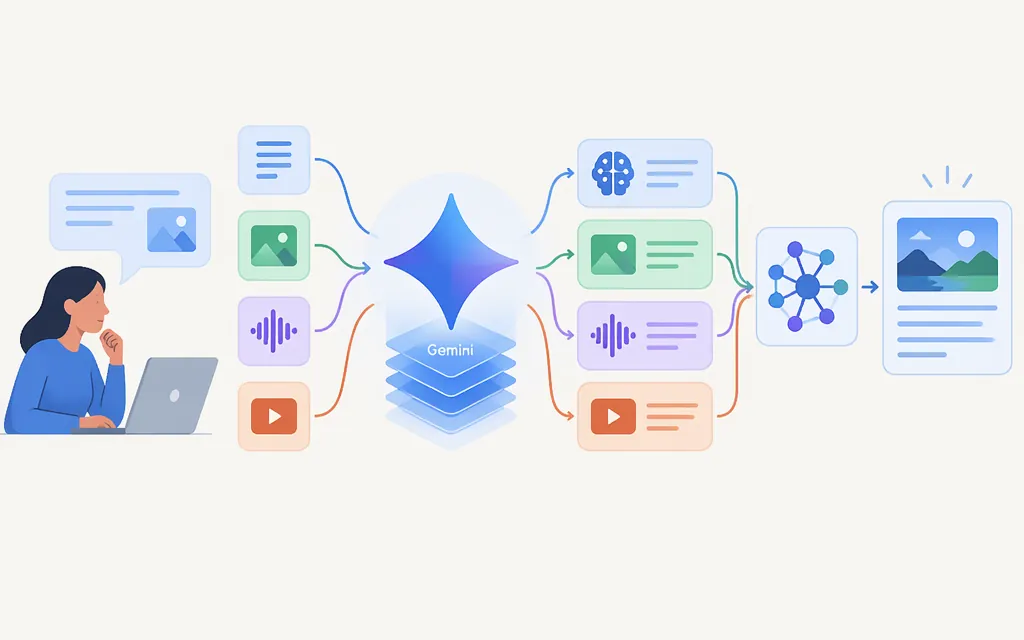
Gemini accepts inputs supported by a particular product or model, processes them in context, and generates an output that product or model supports. For a specific API example, Google describes Gemini 4 Argon (gemini-4-argon) as a transformer-based, sparse mixture-of-experts model. That description applies to Argon—not automatically to every Gemini model or the consumer app. [1][2]
From input to response
At a high level, the process is:
- You provide a prompt and any supported content. Depending on the model, that could be text alone or text together with an image, video, audio, or PDF.
- The model processes the supplied context. Google identifies Argon’s architecture as a sparse mixture-of-experts transformer. As general language-model background—not a complete account of Argon’s internal pipeline—a model represents text as tokens: pieces that may be words, parts of words, or punctuation. Given the context so far, it predicts a likely next token, adds it to the response, then predicts again using the enlarged context. Repeating this step builds a response token by token.
- The model returns an output it supports. Google lists text output for Argon and says the model supports structured outputs, which can help when an application needs a defined format. [1][2]
That general generation process uses patterns encoded in model parameters; it is not, by itself, a live lookup of a source or database. A product or application may use separate retrieval or grounding features, but generation alone does not guarantee current or factual information. Google’s Gemini mobile-app help describes user interactions, not the underlying model mechanics. [3]
What inputs can Gemini work with?
Capabilities depend on the specific model and product. Google’s mobile-app help describes typing, speaking, using an image, and taking a photo. For example, a user can take a photo in the Gemini app and ask a question about it. The help page also describes asking about on-screen content on Android. These are app examples, not proof that every API model accepts the same inputs. [3]
For the Gemini API, Google lists text, image, video, audio, and PDF inputs for Gemini 4 Argon, with text output. The model page also lists structured outputs as supported, while image and audio generation are not supported for this model. Treat these as Argon-specific capabilities, not a specification for every Gemini model. [2]
How to assess Gemini for a production API workload
Use a capability-fit check before choosing a model:
- Define the task and expected result. For example, extract specified fields from an invoice PDF and return them as structured text.
- Match inputs and outputs to the exact model. Google lists PDF input, text output, and structured-output support for Argon. That makes it a capability match to investigate, not a guarantee of extraction quality. [2]
- Check the input route and document constraints. Confirm the applicable file, page, and request constraints for the model and API method you intend to use. [4][5]
- Check context and output limits. Consult the current documentation for the exact model and request route to confirm its input/context budget and maximum output. Do not assume those limits are shared or identical across models or request modes. [2]
- Confirm availability and operational limits. Check that the model and API are available for your use, and review your project’s active rate limits and usage constraints. Google says API rate limits vary by model and project tier. [2][6]
- Test representative documents. Include the layouts, scans, tables, and ambiguous cases your application will encounter. A capability listing does not establish performance on your data.
For the PDF example, verify the model, API route, applicable document constraints, context budget, output needs, and project limits before deployment. [2][4][5][6]
Reliability: verify important responses
Google’s Gemini mobile-app help warns that responses may be inaccurate or inappropriate and advises users to double-check them. It also says not to rely on Gemini for medical, legal, financial, or other professional advice. This is a practical caution, not a measured accuracy score for an API model. For production use, decide what should be checked against trusted data or reviewed by a person based on the consequences of an error. [3]
Bottom line: Gemini processes the context supplied through a product or model and generates an output that model supports. Google describes Gemini 4 Argon specifically as a sparse mixture-of-experts transformer; that should not be generalized to every Gemini offering. For API selection, match the exact model’s listed inputs and outputs to your task, verify its applicable constraints, and test it on representative data.
Sources
Gemini 4 Argon Model Card — Google DeepMind
What you can do with your Gemini mobile app — Google Help
Document understanding — Gemini API