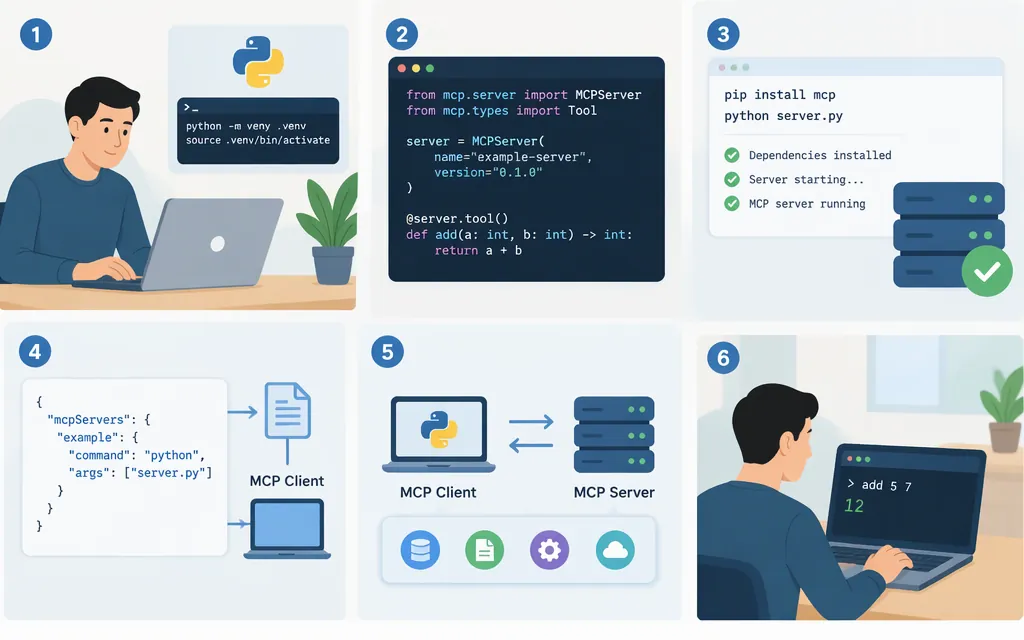
A beginner-friendly way to set up an MCP server is to create a small Python server, expose one tool, and check it with MCP Inspector. This walkthrough pins the official Python SDK to mcp==2.3.0, uses Python 3.11 or newer, and runs locally over stdio. It creates a local tool server; it does not deploy a production service or configure a model API. The SDK’s v2 documentation shows the MCPServer API used below. (github.com)
What you need
- Python 3.11 or newer. (
py.sdk.modelcontextprotocol.io) - uv to create the project and manage packages.
Node.js22.19 or newer to run MCP Inspector withnpx. (modelcontextprotocol.io)- A terminal and a text editor.
1. Create the project and install the SDK
Create the project:
uv init hello-mcp
cd hello-mcp
Before selecting Python 3.11 or adding dependencies, open the generated pyproject.toml and set the project’s Python requirement to:
requires-python = ">=3.11"
Then pin the project interpreter and add the SDK:
uv python pin 3.11
uv add "mcp==2.3.0"
The .python-version pin selects Python 3.11 for this project; the requires-python field declares the project’s supported Python range. (docs.astral.sh)
This tutorial pins a named SDK release rather than making a claim about which release is newest. The official SDK documentation specifies Python 3.11+ for its v2 line, and the project’s release page identifies v2.3.0. (py.sdk.modelcontextprotocol.io)
2. Add a tool and start the server
Create server.py in the project directory:
from mcp.server.mcpserver import MCPServer

mcp = MCPServer("hello-mcp")

@mcp.tool()
def add(a: int, b: int) -> int:
    """Add two whole numbers."""
    return a + b

if __name__ == "__main__":
    mcp.run()
Run the server with uv run server.py when prompted by a compatible client. In this example, mcp.run() uses stdio by default: the client starts the local server process and communicates with it through standard input and output. (github.com)
For a stdio server, do not use print() for debugging: stdout carries protocol messages. Use logging to stderr instead. (modelcontextprotocol.io)
3. Discover and call the tool with MCP Inspector
MCP Inspector can launch a local stdio server and provide a browser-based interface for inspecting and calling its tools. From the project directory, run:
npx @modelcontextprotocol/inspector uv run server.py
Open the local Inspector page shown by the command. In its Tools view, confirm that add appears. Call it with a set to 2 and b set to 3; the expected tool result is 5. That result follows from the example function—it is not a claim that this article executed the test. (modelcontextprotocol.io)
Where a production model API fits
The MCP server exposes a tool. A model-powered host or client connects to the server and uses a model API as a separate part of the workflow; setting up this server does not configure that API. The MCP documentation’s client tutorial describes building an LLM-powered client that connects to MCP servers. (modelcontextprotocol.io)
Token Forge Cloud’s public homepage advertises production APIs for Qwen, DeepSeek, GLM, and Seedance. The setup instructions here do not establish a Token Forge Cloud endpoint, model identifier, authentication steps, request format, or Token Forge Cloud-to-MCP connection, so they are not included as if verified. Confirm the provider’s applicable API instructions and the host’s MCP support before connecting them. (tokenforgecloud.com)
In short: this example supplies the add tool, and Inspector lets you check discovery and a tool call. A production model API and the host that connects to it are separate components; this local tutorial does not configure them or make the server production-ready.
Common problems
- The
mcpimport fails: Check that you are in the project directory and run the script withuv run server.py, so uv uses the project environment. - The tool does not appear: Check the
@mcp.tool()decorator, save the file, then reconnect or restart the Inspector session. - The connection fails after adding print statements: Remove stdout debugging from the stdio server; protocol messages use that stream. (
modelcontextprotocol.io) - You expected a network URL: This setup uses stdio, where the client launches a local process. Remote HTTP hosting is a different setup and is not configured here. (
github.com)
What this setup does—and does not—prove
If Inspector lists add and calling it with 2 and 3 returns 5, that is the expected check for this example’s local tool-discovery and tool-call flow. It does not prove compatibility with a particular production model API, add remote hosting or authentication, or establish production readiness. Treat those as separate integration and deployment tasks.
Sources
MCPServer quickstart example — MCP Python SDK
MCP Inspector — Model Context Protocol