Tested on November 14, 2026.
The short version:
tokenforge/kimi-k3handled 5,000 requests per minute with a 100% success rate, the highest level we tested. That is about 5 million input tokens per minute.- The first token arrived in under a second. At 5,000 RPM the median time to first token was 0.96 seconds and p95 was 1.26 seconds.
- Latency did not drift with load. Going from 1,200 to 5,000 RPM, the median stayed between 0.86 and 0.97 seconds and p95 between 1.18 and 1.27 seconds.
- Output arrived at 169–289 tokens per second, and at 5,000 RPM our p95 time to first token was between a quarter and a twentieth of the Kimi K3 providers we compared on OpenRouter.
- Priced up to 20% below the official Kimi API.
Results at a Glance
We call a load level stable when at least 99% of requests succeed and the p95 time to first token is 5 seconds or less. Kimi K3 passed both at every level we tested, by a wide margin.
| Model | Stable load | Success rate | Time to first token (p50) | Time to first token (p95) | Output speed (p50) | Token throughput |
|---|---|---|---|---|---|---|
tokenforge/kimi-k3 |
5,000 RPM | 100% | 0.96 s | 1.26 s | 169 tokens/s | ~5M TPM (input) |
5,000 RPM is the highest level we tested, not a limit we reached, so Kimi K3's ceiling on this workload is higher.
Latency Stays Flat as Load Grows
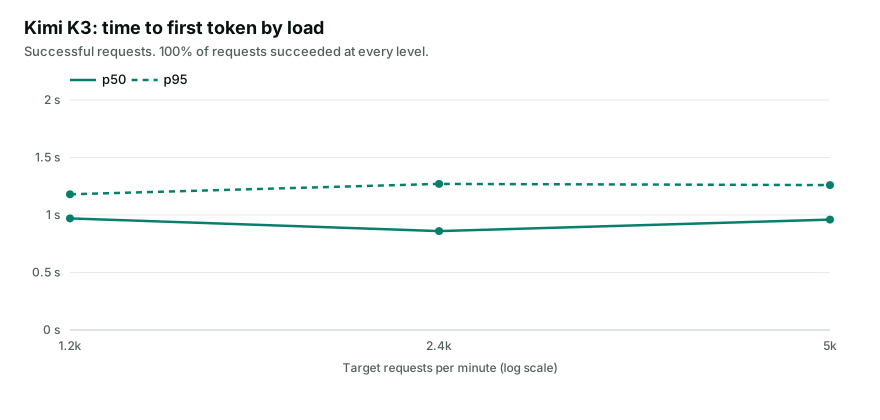
Quadrupling the load did not make the first token arrive later. The gap between the median and p95 stayed at about 0.3 seconds, so the slowest requests were not much slower than the typical one. If your product shows a spinner until the first token arrives, p95 is the number to plan for (why p95 matters more than the average).
| Target RPM | Requests | Success rate | TTFT p50 | TTFT p95 | Output speed (p50) | Total latency (p95) |
|---|---|---|---|---|---|---|
| 1,200 | 1,200 | 100% | 0.97 s | 1.18 s | 289 tokens/s | 2.21 s |
| 2,400 | 2,400 | 100% | 0.86 s | 1.27 s | 282 tokens/s | 2.67 s |
| 5,000 | 5,000 | 100% | 0.96 s | 1.26 s | 169 tokens/s | 4.05 s |
Output Speed: How Fast the Answer Arrives
Time to first token tells you when the answer starts. Output speed tells you how long the rest of it takes.
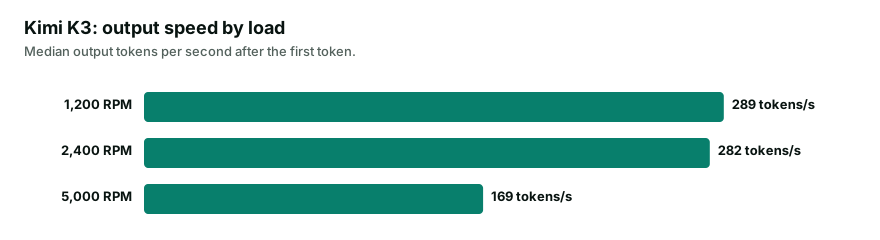
Kimi K3 streamed about 285 tokens per second at 1,200 and 2,400 RPM, and 169 at 5,000 RPM. That drop came without a single failed request, which makes it an early signal: output speed falls before errors start, so 5,000 RPM is close to where Kimi K3 begins to slow down on this workload. Even then, a 300-token answer finished within about 4 seconds for 95% of requests (why raw tokens per second is not the whole story).
Two practical takeaways:
- Watch output speed and p95 time to first token, not only the error rate. They move first.
- Plan capacity in concurrent requests and tokens, not only RPM. Longer answers hold each request open longer, so the same capacity serves fewer requests per minute (RPM, TPM and concurrency explained).
How It Compares With Providers on OpenRouter
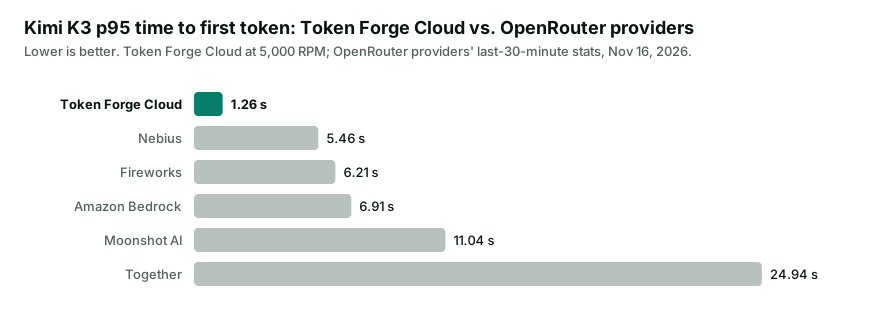
OpenRouter publishes live latency statistics for every provider that serves a model. Here is our p95 time to first token next to several of them, including Kimi K3's developer, Moonshot AI.
| Provider | Time to first token (p95) | Throughput (p50) |
|---|---|---|
| Token Forge Cloud | 1.26 s | 169 tok/s |
| Nebius | 5.46 s | 65 tok/s |
| Fireworks | 6.21 s | 57 tok/s |
| Amazon Bedrock | 6.91 s | 52 tok/s |
| Moonshot AI | 11.04 s | 31 tok/s |
| Together | 24.94 s | 43 tok/s |
Our p95 is between a quarter and a twentieth of the providers shown, and our output speed is more than twice theirs.
About this comparison: the OpenRouter figures are each provider's p95 latency and median throughput over the 30 minutes before we read them on openrouter.ai on November 16, 2026. Where a provider runs several endpoints for a model, we show its fastest. OpenRouter measures real traffic with prompts of many lengths. Our figures come from the controlled test described below, at 5,000 RPM. The conditions differ, so treat this as a directional comparison.
Compatible With the Official API
Capacity is only useful if the model behaves the way its documentation says. We checked the features production code depends on against Kimi K3's official behavior.
| Check | Result |
|---|---|
| Tool calls | Pass |
| JSON mode | Pass |
| Reasoning levels | none turns it off; low, high, max work |
Reasoning stays in max_tokens |
Pass |
| Prompt cache on a repeated prompt | 99.95% of 15,013 tokens cached |
| Image input | Base64 and https links |
Usage is reported in the OpenAI format: cached tokens in prompt_tokens_details.cached_tokens and reasoning tokens in completion_tokens_details.reasoning_tokens, so the cache savings show up on your bill and in your own logs.
How We Ran the Test
Clients. Four load-generating machines in the United States, sending in parallel.
Fixed schedule. Each request was sent at a pre-scheduled time, regardless of whether earlier requests had returned, so the offered load stayed constant even when responses slowed down.
No cache shortcuts. Every prompt was about 1,000 input tokens with a unique beginning, so no response could come from a prompt cache. Every response was streamed with max_tokens set to 300 and reasoning off (reasoning_effort: "none").
Load steps. 1,200, 2,400 and 5,000 RPM, one minute each.
Metrics:
- Time to first token (TTFT): from sending the request to receiving the first token. Only successful requests are counted.
- Output speed: output tokens per second after the first token.
- Total latency: from sending the request to the end of the stream.
- Token throughput (TPM): input tokens of successful requests per minute.
What These Results Cover
These numbers describe a specific workload, and we want you to know its limits:
- About 1,000 tokens in and up to 300 out. Longer answers hold each request open longer and lower the request rate. Long agent loops do more work per request.
- No reasoning. Higher reasoning effort generates more tokens and takes longer. Kimi K3 reasons at
mediumwhen a request does not setreasoning_effort; sendnoneto match this test. - Short steps. Each step lasted one minute. These are step tests, not multi-hour runs, and limits that build up over longer periods would not show here.
If your traffic looks different, the method above is easy to reproduce with your own prompts. Create an account and test it with your own workload, or contact us if you need limits above the default.