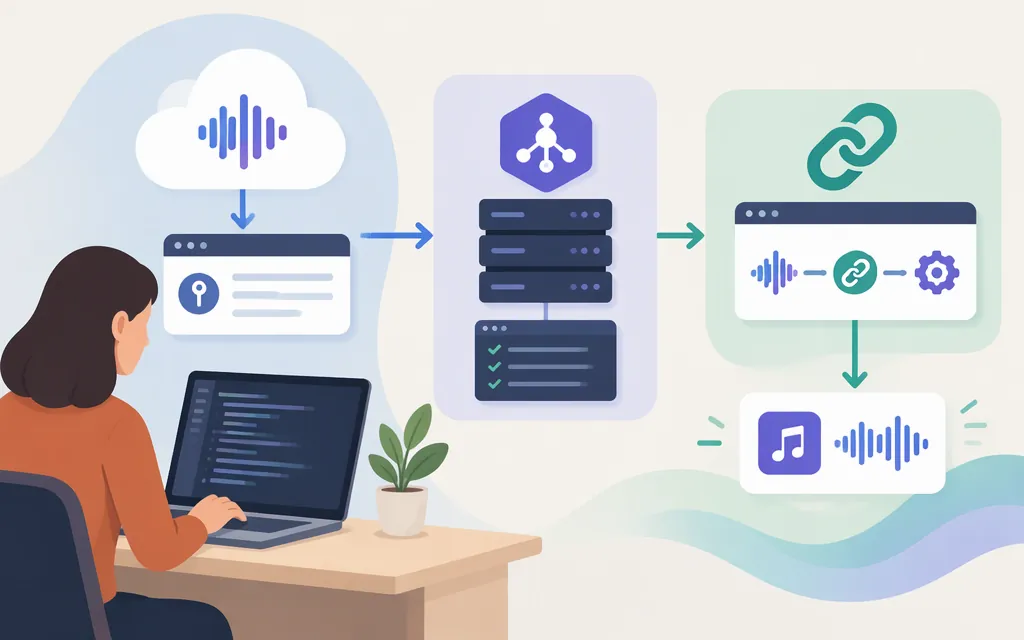
Short answer: Suno’s API-account portal does not, by itself, establish public self-service access to a general REST API. Suno’s MCP beta is a separate route for working with music through a compatible AI assistant. For backend integration, EvoLink publishes its own API instructions; its endpoint, key, models, billing, and terms are provider-specific—not a universal Suno REST specification.
Status checked November 8, 2026. An API-account portal, an assistant connector, and a third-party API are different integration routes.
Which route fits your project?
| Route | What it’s for | What’s established |
|---|---|---|
| Suno API-account portal | Managing a Suno API account | Suno has a platform portal labeled for API-account management. The information reviewed here does not establish public self-service eligibility or a complete public REST reference. Confirm access and documentation with Suno before building against it. |
| Suno MCP beta | Using music features through a compatible AI assistant | Suno documents an MCP server and assistant setup instructions. It requires a Suno account; this is not a generic REST API for your application backend. (Suno MCP) |
| EvoLink API | Calling a provider’s music-generation API from an application | EvoLink publishes its own host, Bearer authentication, generation request, and asynchronous task workflow. Those instructions apply to EvoLink, not every service marketed as a “Suno API.” (EvoLink quickstart) |
An October 17, 2025 Skywork article reported that Suno had not released a public developer API at that time. That dated secondary report does not settle current access; the existence of an API-account portal does not, by itself, prove general public REST availability. (Skywork’s report)
Official Suno MCP: connect an assistant, not your backend
Suno’s help guide says you need a Suno account and an assistant that supports MCP. Setup varies by assistant, so check whether your chosen assistant currently supports custom MCP connections and what access its setup requires. (Suno’s setup guide)
For Claude, Suno’s guide says to open Customize → Connectors → + → Add custom connector, name it Suno, and enter https://api.suno.com/mcp. Then select Connect, sign in to Suno, and approve the connection. Suno says MCP does not require an API key, uses your Suno credits, and saves songs to your Suno library. (Suno’s setup guide; Suno MCP)
This route is for creating or working with songs from a compatible assistant. It is not a documented REST endpoint for embedding music generation in your own server or product.
EvoLink example: submit a generation request
The following is EvoLink’s example—not a Suno-owned REST request. EvoLink’s quickstart directs developers to obtain an EvoLink API key and shows a POST request with Bearer-token authentication. Store the key outside source code, such as in an environment variable. (EvoLink quickstart)
export EVOLINK_API_KEY="your_key_here"

curl --request POST \
  --url https://api.evolink.ai/v1/audios/generations \
  --header "Authorization: Bearer ${EVOLINK_API_KEY}" \
  --header 'Content-Type: application/json' \
  --data '{
    "model": "suno-v5-beta",
    "custom_mode": false,
    "instrumental": false,
    "prompt": "A cheerful summer pop song about road trips and freedom"
  }'
EvoLink documents this host, model ID, endpoint, and payload in its own quickstart. Obtain a current key through EvoLink and confirm your account’s access to the chosen model before using the example. The available quickstart identifies where to get a key but does not provide a detailed account-creation walkthrough here. Do not transfer these fields or this model name to another provider. (EvoLink quickstart)
What happens after submission?
EvoLink describes generation as asynchronous: the creation request returns a task ID, which you save and use with GET /v1/tasks/{task_id} to check the task. Its task-status documentation describes the usual client-visible states as processing, completed, and failed. When a task is complete, EvoLink’s guide says to save the final audio URL. (EvoLink quickstart; task-status guide)
EvoLink’s Suno generation documentation says generated audio links are valid for 72 hours. Download or otherwise store the audio you need before that window expires. (EvoLink generation documentation)
Implementation limit: The documentation available for this guide does not establish the exact task-ID property in the submission JSON, the polling request’s authentication requirements, the full task response schema, the precise audio-result field name, or detailed failure handling. Use EvoLink’s current task and generation references for those details before writing result-parsing code. Treat the example above as a documented submission pattern, not a complete production implementation; do not assume the generation request’s authentication details automatically specify the task-status request.
Cost: confirm the provider’s current rate
There is no single price for “the Suno API.” EvoLink’s March 28, 2026 pricing article quoted 8 credits ($0.111) per song for standard generation. EvoLink’s product page separately lists $0.118 (about 8 credits) per generation and says each generation returns two tracks. Because the units and totals differ, confirm the current price, billing unit, and what counts as a billable generation before estimating costs. These are EvoLink-specific figures—not Suno-direct API pricing—and the pricing article excludes Persona creation and other specialized tasks. (EvoLink pricing article; EvoLink product page)
EvoLink’s product page also says the service may experience occasional downtime and is suitable for development and testing. That does not establish an uptime or support commitment for your production workload; review current service terms and commitments directly. (EvoLink product page)
Production checklist
Before shipping, verify the details for the specific route and provider you chose:
- Access and provenance: Is this Suno MCP, Suno’s API-account portal, or a third-party API? Who operates the service, and what access does your account have?
- Technical contract: Confirm the base URL, authentication, required fields, model IDs, task-status endpoint or callback, response schema, error states, and rate and concurrency limits.
- Billing: Confirm current prices, billing units, failed-task charges, and exclusions. Keep provider API charges separate from any Suno plan or credits.
- Operations: Check reliability commitments, support, and how provider endpoint or model changes are handled. A development-and-testing caveat is not a production service guarantee.
- Security and
data:Review how the provider handles credentials, prompts, uploaded media, and generated files. - Terms and output rights: Read current terms for API access and for your intended use of generated tracks. Do not assume Suno consumer-plan terms automatically govern a separate provider’s API.
Skywork’s October 2025 article raised possible breakage, terms-of-service, and credential-handling concerns about unofficial wrappers. That is dated secondary reporting, not a security audit of EvoLink or a legal conclusion about every provider. Evaluate the specific service and its current terms. (Skywork’s report)
Bottom line
Suno’s API-account portal does not by itself establish general public REST access. Use Suno MCP to work with music through a compatible assistant. For a backend integration, EvoLink publishes a provider-specific request and task workflow, but the exact task and audio-result fields and some operational details still need confirmation in its current documentation before production deployment.
Sources
How do I connect Suno MCP (Beta) to an AI assistant?
Query Task Status - EvoLink.AI
Suno Music Generation Beta - EvoLink
Suno API Pricing Explained: EvoLink Public Pricing and Usage