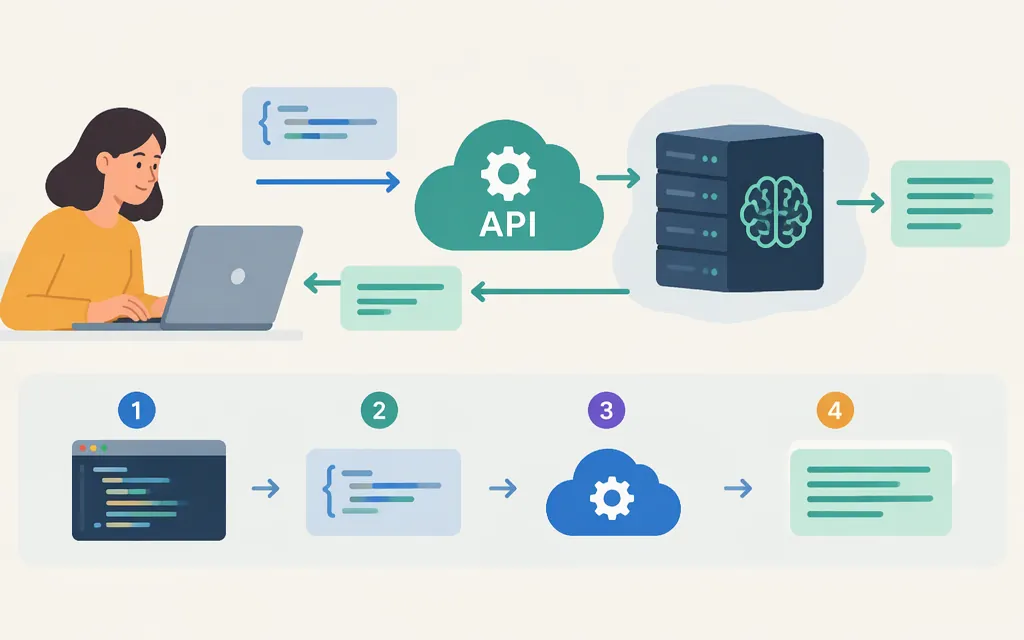
The OpenAI API lets software send requests to OpenAI models and use their responses in an application. For new text-generation integrations, OpenAI recommends the Responses API. ChatGPT is a product people use directly; an API key is a credential for authenticating API requests—not the API itself. (Responses API guidance)
What is the OpenAI API?
An application can send a model input, such as a prompt, and use the response in its own workflow or interface. For example, a customer-service app could ask a model to draft a support reply for an agent to review. OpenAI documents direct model requests for text generation through the Responses API. (Text generation guide)
The API and ChatGPT are different ways of using OpenAI’s technology:
- ChatGPT is a product for people to interact with directly.
- The API is for developers who want to connect model capabilities to their own software.
- An API key is a secret credential used to authenticate API requests. Keep it out of public apps and source code. (API key help, Python SDK guidance)
ChatGPT and API billing are separate. Don’t assume a ChatGPT subscription automatically pays for API usage; check current API pricing and any credit eligibility that applies to your account. (Billing guidance)
What can developers use it for?
A documented starting point is text generation: an application sends input to a model and uses the returned response. A support tool, for instance, might request a draft answer based on a customer’s question. This is an illustrative application, not a guarantee that a model will produce a suitable answer without review. (Text generation guide)
Choose a model and API surface for the task, and check current documentation for availability and requirements. The example below uses the model identifier shown in the official Python library’s example; confirm it is available to your project before relying on it. (OpenAI Python library)
Make a first direct request with Python
You’ll need access to an OpenAI API project and a key you can use for it. If you don’t have access to a usable project, ask its owner for help. Create and manage keys through the API key page. The complete secret is shown only when you create it, so save it securely. (API key help, Projects guidance)
Check that the project has API access and available credit before making a request. API billing is separate from ChatGPT. New API accounts use prepaid billing; if you have no available free credits, you’ll need to add payment details and purchase API credits. The current minimum initial credit purchase is $5. (Billing guidance, Prepaid billing guidance)
You’ll also need Python and the official OpenAI Python SDK. Keep the key in your local environment or on your server—never put it in browser-side code or publish it in a repository. The SDK can read the key from an environment variable. (OpenAI Python library, SDK guidance)
-
Install the SDK:
pip install openai -
Set the key in your shell, replacing the placeholder with your own key:
export OPENAI_API_KEY="your_api_key_here" -
Save this as
example.pyand run it withpython example.py:from openai import OpenAI client = OpenAI() response = client.responses.create( model="gpt-5.5", input="Write one sentence explaining what an API does.", ) print(response.output_text)
If the request succeeds, response.output_text prints the generated text. The official Python library’s Responses API example uses this property. If the request fails, check the error and confirm that the key, project access, credit balance, and model availability are correct. (OpenAI Python library)
What to check before production
Before deploying, verify these details for the model and API features your application will use:
- Billing: Check current rates and usage units. API charges are separate from ChatGPT billing. (Billing guidance, Pricing)
- Limits: Review the current limits for your organization and selected model or API surface in the API reference. (API reference)
- Credentials and data handling: Follow current official guidance for protecting keys and review the applicable data-handling information for your use case.
The API is relevant when you want model capabilities inside software you build. If you only want to interact with an assistant directly, ChatGPT may be the more relevant product. If you’re building an application, start with the API quickstart and verify the access, model, cost, and limits that fit your use case. (Developer quickstart)
Sources
Where do I find my OpenAI API Key?
Managing billing for ChatGPT and the API platform
Managing projects in the API platform